 Instructobit

Securing credentials and other sensitive keys on a web application can be a difficult task for developers. The question of what level of security and encryption is necessary for the type of application you are running can be tough to answer and is generally not standardised. However, for certain types of applications there is a minimum level of security that should be applied in order to ensure that your credentials aren’t compromised, and remain secure if your code is compromised or even if your server is breached.
In this article we will cover some common practices used to store credentials and other sensitive information in an application, ranging from the least secure to most secure.
Please note that the first few methods are used for reference as to what inadequate security looks like and should definitely not be used in any client facing applications or those that interact with personally identifiable information (PII).
No security, credentials stored in code
This is very dangerous and should not be done for any production applications! This involves having your credentials directly within your code, usually declared as string variables.
user = ‘admin’
password = ‘password123’
db.connect(user, password)
Not only is this practice dangerous as it exposes your credentials in plain text within a file that is potentially accessible to outside users, but if your project is stored on a version control system, it will also expose the credentials on there to other developers who may not be authorised to see those credentials, removing the credentials from your VCS in the future may be difficult as it will still reside within your file history.
This type of credential storage is really only suitable for running local test scripts on non-production databases or hosts with no data to potentially expose. This should never be used for production applications interfacing with sensitive data! You tend to see this a lot in tutorials, and this is simply to allow you to better understand the problem at hand, do not import these examples directly into your production code without first securing your credentials properly.
Credentials stored in separated file within the project
This isn’t much of a step up from the previous approach and again should not be used for production applications. However, by creating a separate file within the project to store credentials, you can at least ensure that it has correctly secured file permissions within your web application.

Having this file within your project still potentially exposes it on your version control system to unauthorised developers or viewers, however it is easier to rid yourself of the entire file from your VCS repository in the future. That being said, this method is still not secure enough for production applications of any kind.
Credentials stored in a temporary text file separated from the project
By keeping your credentials in a file completely separate from your project, you mitigate the risk of unauthorised individuals accessing them through your VCS, it also means the file is not within the file system scope of your project, providing more security.
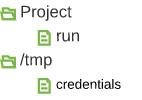
One issue with this approach is that if a server is shut down unexpectedly you could potentially recover such temporary files if you do not give the operating system a chance to purge those temporary files. Therefore if a bad actor gets their hands on a server that contains both your application and PII or other sensitive data, they could potentially piece it together again.
This approach is a better start for securing your credentials, and it may be suitable for internal-only applications that do not interact with any personally identifiable information (PII). But I would not suggest only having this level of security for client facing applications or anything that interacts with PII.
Credentials stored in temporary environment variables
Storing your credentials in a per-session local environment is somewhat more secure than storing them in a temporary file as these session environment variables are volatile and will be lost when the machine reboots, meaning that if the server is stolen, the attacker will not be able to recover your credentials.
root@computer:~$ export DBPASS=password123
root@computer:~$ ./run
If your system is compromised by an attacker- provided they are able to access the user session on which your application is running- they will be able to access these environment variables.
This approach may also be suitable for internal-only applications that do not interact with PII. However, this again would not be suitable for client-facing applications or those that interact with PII.
Credentials stored in a secure vault
For client-facing applications and those that interact with PII, it is necessary to ensure that your credentials and other sensitive keys are properly encrypted, stored and accessed in a secure manner.
There are several different ways you can store your sensitive keys in a securely encrypted vault of some sort, again with different levels of security which would meet different applications needs. We will cover a few in this article, but if none of these suit the needs of your application then there are plenty more to choose from.
All the below examples will assume the use of secure and well-tested encryption algorithms such as AES, ensuring that you implement the correct encryption practices such as the use of long randomised keys and initialisation vectors.
Single encrypted vault, when opened stored in memory
In this scenario, you could create your application keys in a plain text format such as XML, JSON or even just a delimited file, store this in a file, and then encrypt the file. This file- depending on the size- will likely need to be encrypted in blocks (segments of plain text of equal length that get encrypted on their own and then get added to the encrypted file).
When starting your application the key to the encrypted file can either be requested by the application on startup or stored temporarily in an environment variable during startup and then removed. The decrypted vault can then be stored in memory and keys can be requested as necessary.
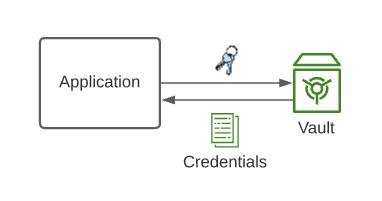
Storing secure credentials in memory is rather controversial as it means you are relying on your operating system to protect your keys. There are a few pitfalls to consider if implementing this approach, such as paging memory from RAM to hard drives which could expose the credentials, similarly hibernation could expose this memory by storing the entire contents of your memory to the hard drive.
However, if you somehow mitigate these issues by disabling virtual memory and hibernation, it prevents non-admin users without escalated privileges from reading the in-memory decrypted vault, however it becomes vulnerable if an attacker gets in as the same user the application is running under or as a super user.
Another potential downside to this is that when you need to modify or add a new key to the encrypted vault, you must manually decrypt the entire vault, add your key, then re-encrypt it, making sure to remove any trace of the decrypted file. This leaves the entire credentials vault vulnerable during the time you are editing it.
This particular method may not be a secure enough choice for client facing applications serving or handling PII, however this may be suitable to internal applications handling PII, as an attacker breaching a server that is not open to the public is less of a risk, and this method does ensure that there is no persistent copy of the plain text credentials (assuming you’ve disabled any form of on-disk memory storage).
Vault database, each key decrypted on demand
In this scenario, a database is used to store key-value pairs of encrypted credentials, each credential value encrypted with a unique or shared key depending on the situation (you’ll want to be as granular as possible). Each key is encrypted with its own initialisation vector, usually attached to the encrypted string itself.
When a set of credentials are required, the application accesses and fetches the credentials record, decrypting it with the relevant key, using the credentials for the necessary purpose and then disposing of the plain-text as soon as it is no longer required. This minimises the amount of time the sensitive keys spend in memory where it can potentially be exposed.
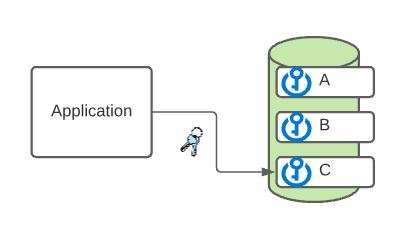
The obvious problem with this approach is that again we have to store the encryption keys to our credentials within memory at some point, these have to also be provided to the application in some way.
As you can see from these two examples it is very difficult to beat having sensitive keys in memory at some point, there simply has to be an entry point for your application somewhere for it to have the necessary availability. However there are steps we can take to limit the amount of data that is exposed in memory and for how long.
Vault application, separated from main application
In this scenario, a separated vault interaction application can be set up, ideally on a completely separate server that has protected access rights from the primary server so that attackers breaching the primary server are not able to breach your vault server.
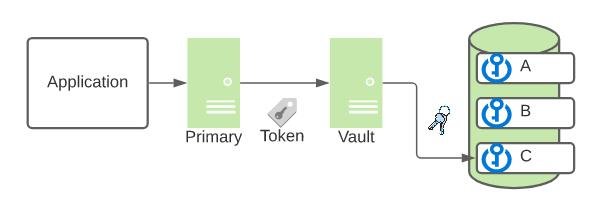
A secure login can be set up from the primary server to the vault server application whereby a temporary access token is provided to the primary with details about which keys it can request.
This method allows you to implement far more control over your vault in that you are able to implement security measures such as access control, transaction limits and misuse detection within your vault application, thereby limiting the amount of damage an attacker can cause even if they are able to breach the primary server. This behaves in a similar manner to an operating system reference monitor in that all access to application keys are mediated, controlled and monitored.
With such a system in place you can start being more confident about the security of your application credentials, especially for applications dealing with PII or other sensitive information. This provides multiple layers of security and a mechanism whereby breaches and misuse can be detected and halted.
If you'd like to contribute to this discussion feel free to leave a comment below!
